








Table of Contents
- 1.
- 1.1
- 1.2
- 1.3
- 2.
- 3.
- 3.1
- 3.2
- 3.3
- 4.
- 4.1
- 4.2
- 4.3
- 5.
- 5.1
- 5.2
- 5.3
- 6.
Advanced Excel interview questions and answers are often practical. Interviewers want to know whether you can clean a dataset, write reliable formulas, analyze business metrics and explain the checks behind a report. The same skills appear in analyst, finance, operations, HR and reporting roles, but their importance varies by job description. A strong candidate can interpret the problem and choose a maintainable solution, rather than recite hundreds of Excel functions.
This guide covers lookups, dynamic arrays, PivotTables, data validation, Power Query and realistic spreadsheet scenarios. The examples use modern Excel functions where appropriate. If the company uses an older version, explain the alternatives because feature availability varies by Excel edition and platform.
Advanced Excel Formula Interview Questions
Excel formulas are useful only when they return accurate, reproducible results. When explaining them, mention cell references, error handling, data types and what happens when the source grows.
What Is the Difference Between XLOOKUP and VLOOKUP?
VLOOKUP searches in the first column of a specified table array and returns a value from a numbered column to its right. XLOOKUP separates the lookup array from the return array, can search in more flexible directions and has an explicit argument for what to return when no match exists. Example: `=XLOOKUP(A2,Products[ID],Products[Price],"Not found")`. XLOOKUP is easier to maintain when return columns move, but it is not available in every older Excel version. If the interviewer asks about compatibility, offer INDEX/MATCH as an alternative. Verify exact matches and duplicate-key behavior before publishing a report. A useful way to prepare for advanced excel interview questions and answers is to test this idea against a specific example.
When Would You Use INDEX and MATCH Together?
INDEX returns a value from a position inside a range. MATCH can find the position of a lookup value; together they can perform flexible lookups without hard-coding a VLOOKUP return-column number. Example: `=INDEX(C2:C100,MATCH(F2,A2:A100,0))` searches column A and returns the corresponding item from C. The `0` requests an exact match, which matters when identifiers are unsorted. Confirm that the lookup and return ranges align, that identifiers are unique when required and that blanks or mismatched text/number formats are handled. A candidate should explain the formula's logic, not merely type it. When practising advanced excel interview questions and answers, explain what changes in an edge case.
How Do SUMIFS, COUNTIFS and IFERROR Work?
SUMIFS adds values meeting multiple conditions, such as sales for a region and date range. COUNTIFS counts matching rows, while IFERROR supplies an alternative result when an expression returns an error. Example: `=SUMIFS(Sales[Amount],Sales[Region],"South",Sales[Status],"Won")` calculates won revenue for South. Do not replace every error with zero through IFERROR: doing so can hide invalid data or broken references. A sound answer explains the expected input format, criteria logic and how to test results against a manual sample. Check whether blanks, duplicate transactions and negative refunds should be included in totals. For advanced excel interview questions and answers, describe the assumption that makes this answer correct.
Strengthen your Advanced Excel Interview Questions and Answers skills through practical training at WHY TAP. Explore courses: Explore WHY TAP Courses
Excel Data Cleaning and Dynamic Array Questions
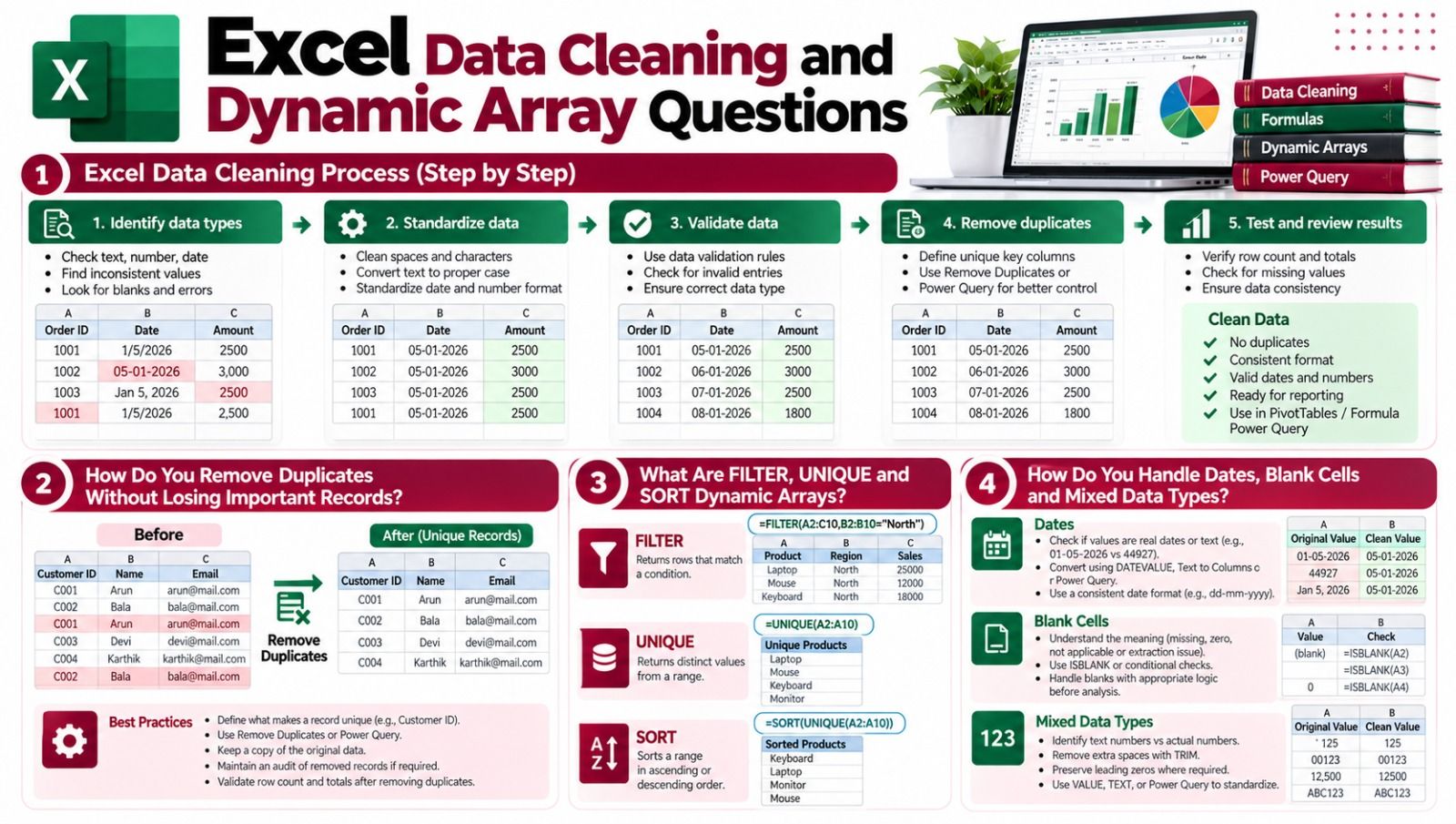
Real reporting tasks often fail because identifiers are inconsistent or source files contain invalid rows. The interviewer may hand you a dataset, so describe how you inspect it before creating a dashboard.
How Do You Remove Duplicates Without Losing Important Records?
First define what constitutes a duplicate. Two identical-looking customer names may represent different customers, while the same transaction ID appearing twice may be a genuine duplication. Copy the dataset or work in a reproducible transformation before changing source records. Use Remove Duplicates when the selected columns truly form a unique key, or use Power Query to document the operation. Preserve an audit of excluded records when the data is sensitive or regulated. Validate the row count, key uniqueness and aggregate totals afterward. The correct answer begins with business rules, not a button click. This topic belongs in advanced excel interview questions and answers because it tests practical judgment. This is a practical topic to revisit when studying advanced excel interview questions and answers.
What Are FILTER, UNIQUE and SORT Dynamic Arrays?
Modern Excel offers dynamic array functions that can return multiple values into adjacent cells. FILTER returns rows matching a condition, UNIQUE returns distinct values and SORT orders results. For example, `=SORT(UNIQUE(A2:A100))` produces a sorted list of unique entries. The spill range can change when source data grows and may show a #SPILL! error if cells block the output. Clarify whether the user needs a static report or a self-updating view. Use structured table references or suitably bounded ranges for maintainability, and consider workbook compatibility before relying on dynamic arrays in a shared team process. In advanced excel interview questions and answers, demonstrate the result rather than only stating a definition. Interviewers evaluating advanced excel interview questions and answers may ask how you would test this result.
How Do You Handle Dates, Blank Cells and Mixed Data Types?
Check whether date-looking values are true date serials or text imported from another system. Test a few suspicious rows and convert them using documented transformations rather than changing display formatting alone. Blank cells may represent missing data, zero, not applicable or an extraction defect—these meanings should not be treated as interchangeable. Trim inconsistent whitespace and standardize identifiers carefully because leading zeros can be meaningful. For reporting totals, confirm that numeric columns contain actual numbers rather than strings. Data-quality checks can include counts of missing values, invalid dates, duplicate keys and totals compared against the original source. Review advanced excel interview questions and answers by comparing two approaches and their limitations. Use a working example to strengthen your advanced excel interview questions and answers preparation.
PivotTables, Power Query and Data Modeling Questions
Advanced Excel interview questions and answers often involve reporting architecture. Know which features summarize data and which features transform and refresh it.
How Do PivotTables Help Analyze Business Data?
PivotTables group and summarize rows without requiring a separate formula for each category. For a sales dataset, place Region in Rows, Month in Columns and Amount in Values to compare totals. Verify that the aggregation is SUM rather than COUNT, especially when numeric data arrived as text. Use slicers where helpful and make sure the source table or connection includes new rows before refreshing. A common trap is interpreting duplicate source transactions as a formula error. Good practice includes verifying a small subset manually and describing the assumptions behind calculated fields or distinct counts. Clear advanced excel interview questions and answers answers should mention what you would verify.
What Is Power Query and How Is It Different From a PivotTable?
Power Query connects to sources, cleans and reshapes the imported data and loads results into a worksheet or Data Model. A PivotTable summarizes data already available in a suitable source or model. For example, Power Query can import twelve monthly files from a folder, standardize field types and append them into one dataset. A PivotTable can then summarize revenue by month and product. Record refresh requirements, file naming assumptions and error-handling steps. A Power Query transformation is reproducible, which is usually safer than repeating manual copy-paste steps every reporting cycle. Use advanced excel interview questions and answers preparation to explain a failure and its resolution.
What Is the Excel Data Model and When Is Power Pivot Useful?
The Data Model enables relationships across multiple tables instead of flattening every column into one huge sheet. Power Pivot supports richer models and DAX calculations where available. For example, Orders can reference Customers and Products by their keys, and a measure can calculate revenue over the related tables. Explain relationship cardinality, missing keys and why blindly merging data can create double counting. The key interview skill is distinguishing a calculated column, an aggregate measure and a transformation step. Not all Excel editions provide exactly the same features, so verify the environment before recommending a solution. For advanced excel interview questions and answers, connect the concept to a genuine project task.
Advanced Excel Practical Test and Dashboard Questions
A practical test may ask you to build an analysis from messy sales, employee or inventory data. Do not start with chart colors. Identify the business question, define the metrics and validate the raw records first.
How Would You Build a Monthly Sales Dashboard?
Clarify which figures stakeholders need: total revenue, orders, average order value, growth, regional trends or product mix. Inspect raw columns for duplicate transactions, returns, tax treatment and date validity. Import and clean the data with Power Query or a documented worksheet process. Create a PivotTable or Data Model for the required aggregation, then add simple charts and slicers. Compare dashboard totals to the source for a selected month. Test refresh behavior when a new file arrives. In the interview, explain what the dashboard helps a manager decide and which data caveats should appear alongside its numbers. An effective advanced excel interview questions and answers response distinguishes facts from assumptions.
How Do You Troubleshoot a Lookup That Returns #N/A?
First verify that the searched identifier exists in the lookup range. Check leading or trailing spaces, numbers stored as text, inconsistent case handling, hidden characters and a shifted or mismatched range. Confirm that the formula requests the intended match type. For XLOOKUP, inspect the lookup and return arrays for corresponding sizes. Rather than hiding errors immediately, isolate a single failing row and compare its actual underlying value with the expected key. After fixing the cause, rerun tests against a small set of known matches and deliberate nonmatches. Decide with stakeholders what the report should display when there is genuinely no match. Practising advanced excel interview questions and answers aloud helps reveal gaps in understanding.
How Would You Explain an Excel Project During an Interview?
Begin with the business problem and the source files. Explain your cleaning rules, why you chose specific formulas or transformations, how you checked results and who used the final workbook. Separate your own contribution from other team members' work. If you built a report that saved time, state the original and new time only if you actually measured both. Mention one obstacle such as inconsistent dates or duplicate IDs and how you resolved it. Prepare to reproduce the key formula or Power Query step using a small example. A clear walkthrough of a real workbook often demonstrates more skill than a list of functions. This example makes advanced excel interview questions and answers preparation more concrete.
Conclusion
Good performance in an Advanced Excel interview comes from combining formulas, reliable data cleaning and practical reporting judgment. Use these advanced excel interview questions and answers to practise explaining not only how a function works but also when a simpler solution is more maintainable. Validate your workbook, version compatibility and business definitions before presenting a result. Microsoft's Excel documentation is a useful reference for Power Query and Power Pivot: Microsoft Official Documentation .
Frequently Asked Questions
Take the next step towards your IT career with WHY TAP. Visit: