In the world of SEO, most marketers focus on content optimization, backlinks, and keywords. But there’s a hidden powerhouse that can significantly boost your visibility that is Advanced Schema Markup.
If you’re still treating schema as an afterthought, you’re leaving a massive SEO opportunity on the table. Schema markup doesn’t just help search engines understand your content; it transforms how your website appears in search results, attracting higher CTR and qualified traffic.
Let’s uncover how advanced schema strategies can become your secret SEO weapon.
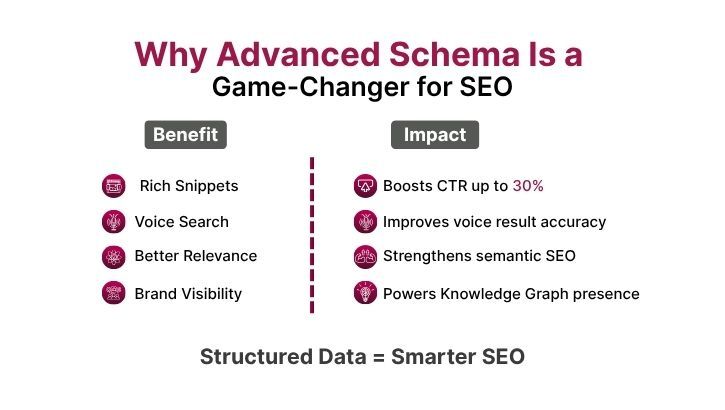
Schema markup is a form of structured data, a code added to your web pages that helps search engines interpret the content better. In simple terms, it’s like labeling your content so Google understands exactly what it is.
For example:
Why It Matters for SEO
Schema markup helps you:
| Schema Type | Purpose | Best Used For |
|---|---|---|
| Article Schema | Helps Google understand blog and news content. | Blogs, news sites. |
| Product Schema | Displays price, availability, and reviews in SERPs. | E-commerce sites. |
| FAQ Schema | Shows expandable Q&A below search results. | Blog posts, service pages. |
| How-To Schema | Displays step-by-step guides directly in results. | Tutorials, DIY blogs. |
| Organization Schema | Highlights company name, logo, and social profiles. | Corporate websites. |
| Local Business Schema | Improves local visibility with address and opening hours. | Brick-and-mortar businesses. |
| Event Schema | Displays event details in search results. | Workshops, webinars, conferences. |
| Course Schema | Promotes online courses directly in SERPs. | Training institutes, e-learning sites. |
| Review Schema | Shows star ratings and reviews. | Product pages, service testimonials. |
| Breadcrumb Schema | Helps users understand page hierarchy. | Large websites with multiple levels. |
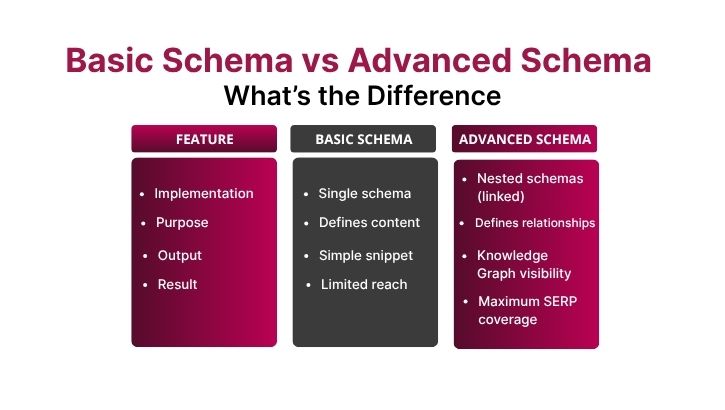
Most websites implement basic schema, but advanced schema strategies go a step further.
| Feature | Basic Schema | Advanced Schema |
|---|---|---|
| Implementation | Single schema per page. | Multiple schemas linked together (nested schema). |
| Purpose | Defines content type. | Defines relationships between entities. |
| Output | Simple rich snippet. | Knowledge graph visibility, voice search triggers. |
| Example | Blog post with article schema. | Blog post with article + author + FAQ schema. |
Advanced schema helps search engines connect the dots that linking your business, content, authors, and services for deeper semantic understanding.
1. Use Nested Schema Markup
Instead of using a single schema, nest multiple relevant ones together.
For example, if you publish a blog post written by your team:
Combine:
This approach gives Google a complete context: Who wrote it, for which company, and what it’s about.
2. Implement FAQ and How-To Schema Together
When you publish a tutorial blog, combine both FAQ and How-To schema to cover intent-based queries.
This strategy makes your result more interactive and increases click potential.
3. Optimize for Voice Search with Speakable Schema
Voice search queries are increasing rapidly.
Using the Speakable schema helps search engines identify which parts of your content can be read aloud by smart assistants like Google Assistant or Alexa.
✅ Best used for news sites, blogs, and FAQs.
4. Add Schema to Your Videos
If you’re embedding YouTube videos or hosting your own, add Video FObject schema to let Google display video thumbnails, duration, and description in search results.
This enhances visibility on both Google Search and Google Discover.
5. Mark Up Your Author and Organization Details
Use Person and Organization schema to build strong author entities.
Google is emphasizing E-E-A-T (Experience, Expertise, Authoritativeness, and Trust) — linking authors with content gives you a trust advantage.
6. Leverage Review and Rating Schema for Trust Signals
Displaying ratings in search results not only improves visibility but also builds trust.
Use AggregateRating within your Product or Service schema.
7. Build a Knowledge Graph Entity
By combining multiple schemas (Organization + WebSite + Logo + Social Profile), you can help Google create or enhance your brand’s Knowledge Panel and the information box on the right side of search results.
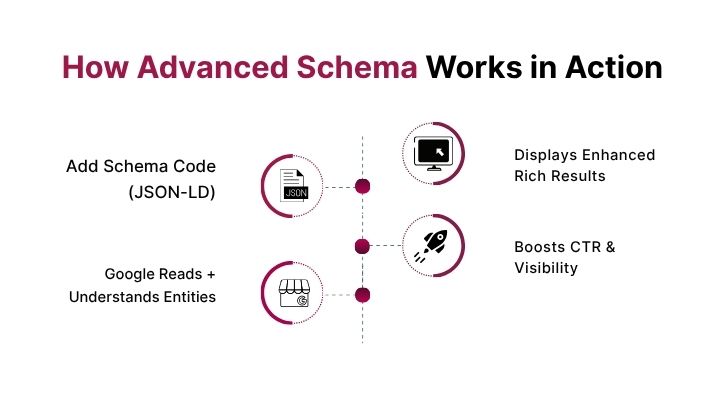
8. Use JSON-LD Format
Always implement schema in JSON-LD format — Google’s preferred method.
It’s easier to read, edit, and validate using Google’s Rich Results Test Tool or Schema.org Validator.
✅ Pro Tip 1: Always validate your schema using Google’s Rich Results Test before publishing.
✅ Pro Tip 2: Keep your schema updated when changing product prices, course details, or event timings.
✅ Pro Tip 3: Don’t overuse multiple schemas unnecessarily — relevance is key.
✅ Pro Tip 4: Implement @id attributes to create unique identifiers for your business or authors across the web.
✅ Pro Tip 5: Use Google’s Structured Data Markup Helper if you’re a beginner, and switch to manual JSON-LD once confident.
✅ Pro Tip 6: Track your performance in Google Search Console → Enhancements tab → See how your schema is performing.
✅ Pro Tip 7: Combine schema with strong on-page SEO — title tags, meta descriptions, and internal links for maximum impact.
Let’s see how businesses benefit:
| Website Type | Before Schema | After Schema Implementation | Result |
|---|---|---|---|
| E-commerce Store | Product listings without star ratings. | Product + Review + Price Schema added. | 32% CTR increase. |
| Digital Agency | Plain service pages. | FAQ + LocalBusiness + Review schema. | Higher local rankings. |
| Educational Website | Generic blog posts. | Course + Article + Speakable schema. | Improved voice search impressions. |
Remember, quality and accuracy always outweigh quantity.
| Tool Name | Purpose |
|---|---|
| Google Structured Data Markup Helper | Helps you generate schema code visually. |
| Schema.org | Reference site for all schema types. |
| TechnicalSEO.com Schema Generator | Quick generator for JSON-LD code. |
| Google Rich Results Test | Validates and tests schema output. |
| Merkle Schema Generator | For nested and custom schema creation. |
Schema markup might seem technical, but it’s one of the most underrated SEO superpowers in your toolkit.
When implemented strategically, advanced schema not only enhances how search engines understand your site but also transforms your visibility with rich, eye-catching results.
So the next time you’re optimizing your website, remember -
💡 The Secret SEO Weapon Nobody’s Talking About… is Advanced Schema Strategies!