









Table of Contents
- 1.
- 2.
- 3.
- 3.1
- 4.
- 5.
- 6.
When it comes to SEO, most marketers focus on backlinks, keywords, and content optimization. But there’s a hidden gem within your website that can skyrocket your search visibility that is Internal Linking.
Internal linking not only helps users navigate your website but also builds a strong SEO architecture that tells Google what’s important on your site. If done right, it can enhance crawl efficiency, page authority distribution, and user engagement.
Let’s uncover the hidden power behind internal linking and how you can strategically use it to boost your rankings.
What Is Internal Linking?
Internal linking refers to the practice of linking one page of your website to another within the same domain. These links guide users through your site, creating a hierarchy of information and improving accessibility.
For example, if your homepage links to a “Services” page, and the “Services” page links to a “Pricing” page, that’s an internal link structure.
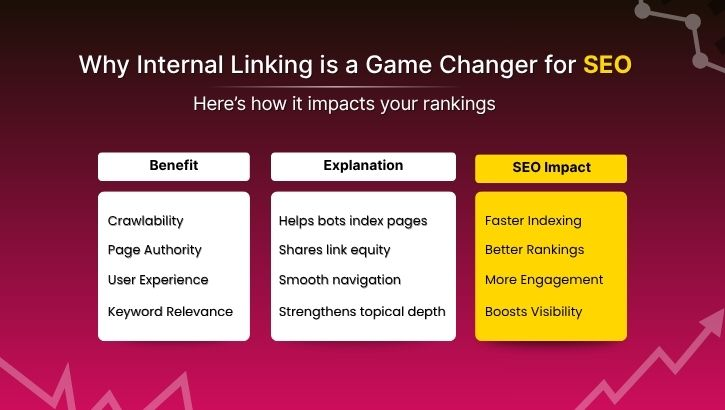
Why Internal Linking Matters for SEO
| Benefit | Explanation | Impact on SEO | ||
|---|---|---|---|---|
| Crawlability,Helps search engine bots discover and index new pages easily,Faster indexing and improved visibility. | Page Authority Flow,Passes link equity (PageRank) from one page to another, Strengthens ranking signals across your site. | User Experience,Guides visitors logically through your content journey,Increases time on site and reduces bounce rate. | Keyword Relevance,Using anchor texts strategically connects related content,Enhances topical authority and keyword targeting. | Conversion Path Optimization,Leads users from informational to transactional pages,Boosts conversion rates and goal completion. |
The SEO Architecture Behind Internal Links
Think of your website as a city map. Each page is a building, and internal links are the roads that connect them. Without proper roads (links), even the best buildings (content) remain hidden.
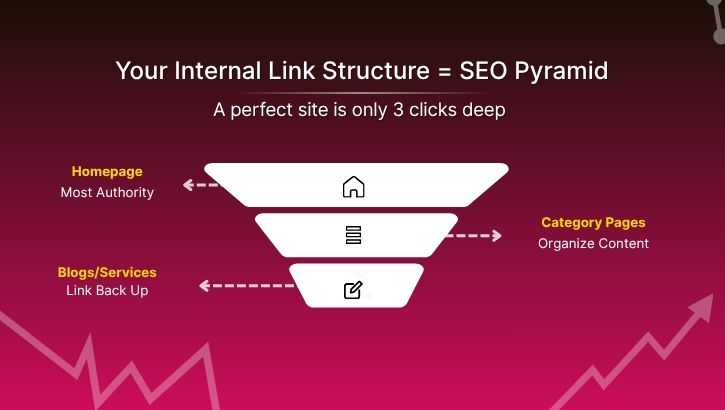
The best internal linking structure resembles a pyramid:
- Homepage (Top Level): Most authoritative page.
- Category Pages (Mid Level): Organize your topics logically.
- Individual Posts/Service Pages (Bottom Level): Link back to categories and related posts.
This architecture ensures that every important page is only 2–3 clicks away from the homepage and a key ranking factor for usability and crawl depth.
Types of Internal Links
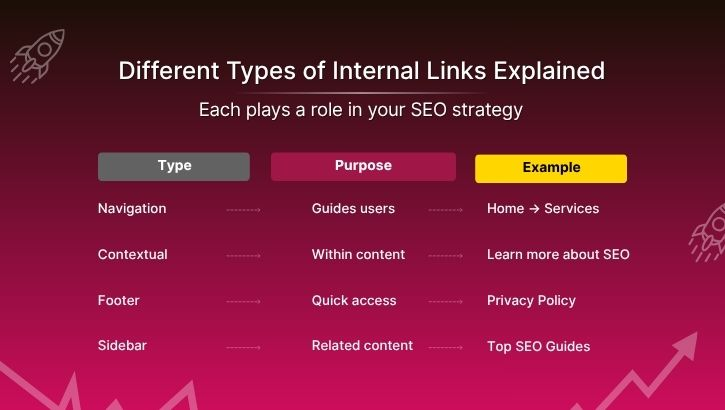
| Types of link | Purpose | Example | ||
|---|---|---|---|---|
| Navigation Links,Found in menus or footers; guide primary navigation,Home → Services → Contact | Contextual Links,Within content; connect related topics,“Learn more about [on-page SEO techniques].” | Footer Links,Offer quick access to legal or policy pages,Privacy Policy, Terms of Use | Sidebar Links,Used for related posts or top articles,“Related Articles: How Backlinks Work” | Breadcrumb Links,Show the user’s location in the site hierarchy,Home > Blog > SEO > Internal Linking |
Pro Tips: Building an Effective Internal Linking Strategy
1. Use Descriptive Anchor Texts
Avoid generic phrases like “click here” or “read more.” Instead, use keyword-rich, meaningful anchors.
✅ Example: Instead of “Learn more,” use “Learn more about mobile SEO optimization.”
2. Link from High-Authority Pages
Pages with more backlinks have higher PageRank. Linking from these pages to lower-ranking pages distributes authority effectively.
+++Ensure all important pages are accessible within 3 clicks from the homepage to enhance both UX and crawlability.
4. Avoid Overlinking
Don’t stuff too many internal links in one post. A good benchmark is 2–5 internal links per 1,000 words of content.
5. Regularly Audit Internal Links
Broken or outdated links hurt SEO. Use tools like Google Search Console, Ahrefs, or Screaming Frog to identify and fix them.
Example of a Strategic Internal Link Flow
Example of a Strategic Internal Link Flow
| From Page | To Page | Anchor Text Used | |
|---|---|---|---|
| “SEO Basics Guide”, “Keyword Research Techniques”, keyword research guide | “Keyword Research Techniques” ,“On-Page SEO Checklist”, on-page SEO optimization | “On-Page SEO Checklist”, “Internal Linking Strategies”, internal linking | “Internal Linking Strategies”, “Advanced SEO Architecture” , SEO site structure |
This structure forms a content cluster, where all related topics interconnect and boosting topical authority and improving SEO rankings.
Tools to Manage Internal Links
| Tool Name | Use Case | Best For | ||
|---|---|---|---|---|
| Google Search Console , Identifies internal links and crawl errors ,Basic SEO analysis | Ahrefs Site Audit , Finds orphan pages and broken links , Advanced SEO monitoring | Yoast SEO (WordPress), Suggests internal linking opportunities , WordPress users | Screaming Frog , Crawls entire site to analyze link structure, Technical SEO | Link Whisper, Automates internal linking suggestions ,Content-heavy websites |
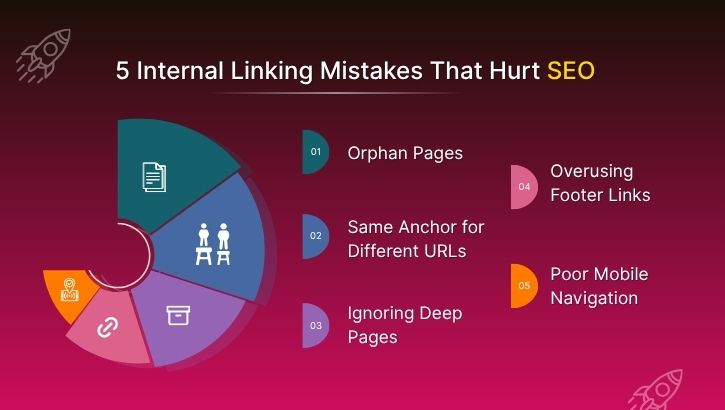
Internal Linking Mistakes to Avoid
- Orphan Pages: Pages without internal links are invisible to Google.
- Using Same Anchor for Different URLs: Confuses search engines about relevance.
- Ignoring Deep Pages: Don’t only link to homepage or top-level pages.
- Overusing Footer Links: They carry less SEO value.
- Neglecting Mobile Navigation: Ensure links are easy to tap and read on small screens.
Quick Checklist Before Publishing
✅ Add at least 3–5 relevant internal links per blog post.
✅ Use keyword-focused anchor texts naturally.
✅ Interlink related clusters (topic silos).
✅ Update older blogs with links to newer pages.
Conclusion :
Internal linking is more than just connecting pages and it’s about building a roadmap for both users and search engines. By mastering this hidden SEO architecture secret, you can enhance crawlability, distribute authority wisely, and create a seamless user experience.
Remember: your website’s internal link structure can make or break your SEO success. Start small audit, plan, and connect and watch your organic rankings rise naturally.
Pro Tip 💡:
Use a content cluster approach and create a main “pillar page” for each topic and interlink it with 5–10 supporting articles. This builds topical depth, boosts ranking potential, and makes your website an SEO powerhouse.