
If you’ve ever searched for something on Google like “best places to eat near me” or “digital marketing course in Chennai” you’ve probably seen some results that stand out more than others. Some listings show star ratings, images, FAQs, course details, or even event dates. These results look richer, more attractive, and more trustworthy.
Have you ever wondered how some websites get these special search features while others don’t?
The secret behind them is something called Schema Markup.
In this blog, we’ll break down schema markup in the simplest way possible: no technical jargon, no coding complexity, just clear, easy understanding. This explanation is perfect for non-technical students, beginners learning SEO, or anyone preparing for digital marketing jobs.
Let’s dive in.
Imagine the internet as a giant library and Google as the librarian.
Your website is one of the many books on the shelf.
Now, if your book has no labels, no summary, and no categories, the librarian struggles to understand what it’s about. Google faces the same challenge with websites.
Schema markup is like adding:
The simplest definition?
Schema markup is a special kind of code that helps search engines understand your website better so they can show richer, more attractive search results.
This code doesn’t change what visitors see on your website, it only helps search engines interpret your content.
You might think:
“Okay, cool… but why should I care about this if I’m not a programmer?”
Here’s the simple answer:
Because schema markup directly impacts how visible and discoverable your website becomes.
Whether you’re learning:
schema markup is a fundamental skill that improves website performance.
In institutes like WHY TAP, students work on real-time projects where skills like schema markup help websites rank better and look more professional.
Even as a student building your portfolio website, schema markup can help your personal profile show up with rich results in Google search, making you stand out to potential employers.
Schema markup turns normal search results into Rich Results, also called Rich Snippets.
Here are some examples:
a) FAQ Schema
This shows expandable questions and answers directly in Google search.
Why it’s useful:
Great for increasing clicks and visibility.
b) Review / Star Rating Schema
You’ve probably seen results with ratings.
Why it’s useful:
Makes your listing look trustworthy and credible.
c) Course Schema
If a training institute offers a course, adding this schema highlights:
Why it’s useful:
Very helpful for educational platforms like WHY TAP to stand out in search results for IT courses.
d) Event Schema
Used for workshops, webinars, placements events, etc.
Why it’s useful:
Shows event date, location, and timing right in Google search.
e) Product Schema
Shows product details, availability, and pricing.
Why it’s useful:
Essential for e-commerce websites.
Overall Benefit:
Schema markup makes your page more clickable, visually appealing, and trustworthy ultimately leading to more traffic.
And notably, statistics show that rich snippets significantly increase click-through rates. For example, one source found that users click on rich results 58% of the time compared to standard listings.
A lot of beginners get scared when they hear the word markup. They imagine complex code, programming, databases, HTML, CSS, and so on.
But here’s the truth:
For beginners is easier than you think.
There are online tools where you simply:
No hardcore coding is needed.
Even in full-stack development or digital marketing training at WHY TAP, students implement schema markup as part of simple practical tasks that improve their live projects.
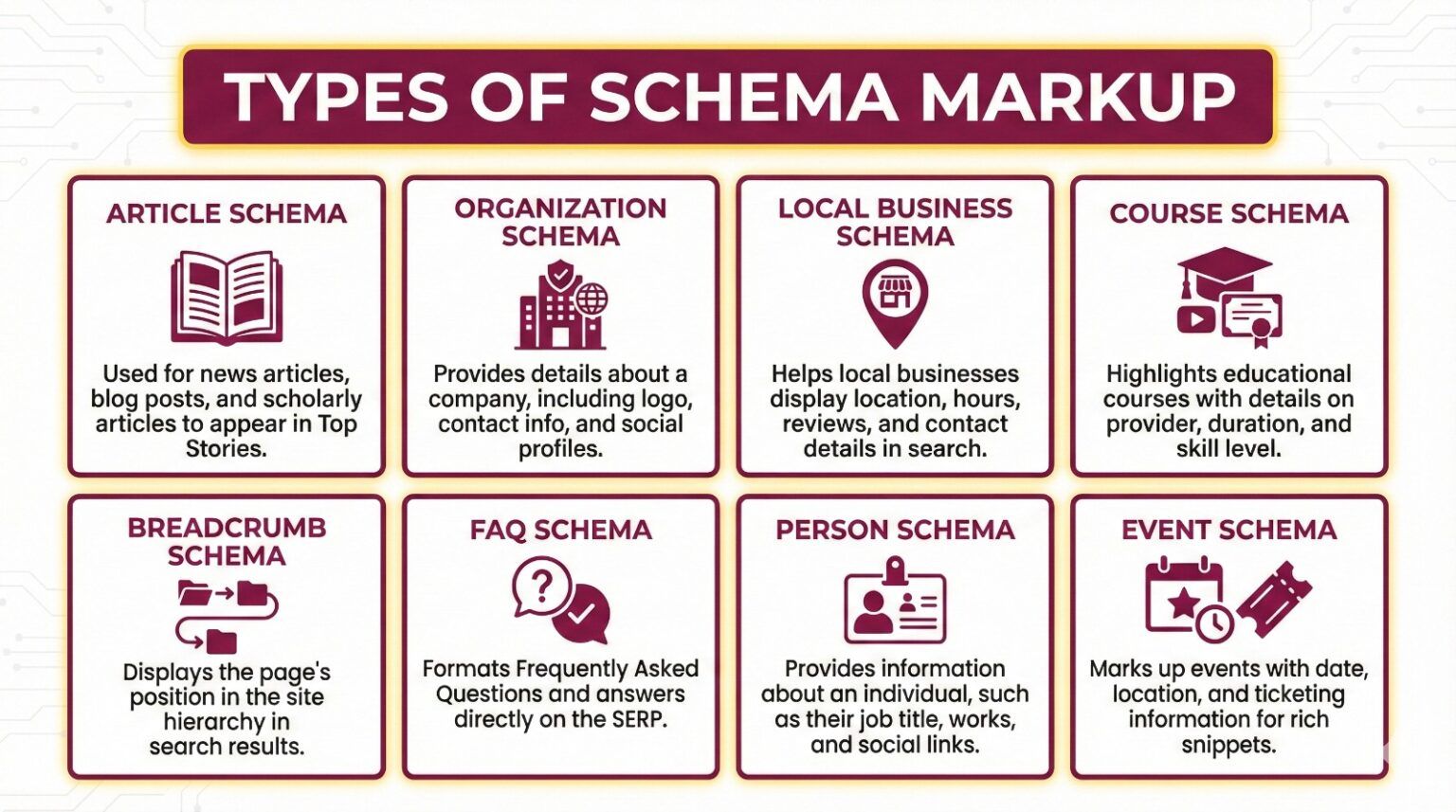
There are hundreds of schema types, but beginners should know just the most common ones.
1. Article Schema
Used for blogs and news articles.
2. Organization Schema
Shows details about a business: name, address, logo, social links.
3. Local Business Schema
Perfect for institutes, restaurants, stores, service providers.
Example: WHY TAP (as a local IT training institute) can use this to highlight their location in Chennai.
4. Course Schema
Used by educational institutions.
5. Breadcrumb Schema
Shows navigation path in search results.
Example:
Home > Blog > What Is SM
6. FAQ Schema
Displays question-answer format.
7. Person Schema
Useful for portfolio sites shows your name, job, education, social links.
8. Event Schema
Used for webinars, workshops, bootcamps.
Google’s main goal is to deliver the best user experience.
Schema markup helps Google:
Think of it this way:
SM changes your search result from a plain text listing into an information-rich card.
Better design → More clicks → Better ranking over time
This is one of the simplest SEO boosts any beginner can use.
Whether you’re learning digital marketing, web development, or data science, schema markup has benefits for you.
Digital Marketing Students
Web Developers / Full Stack Developers
Data Science / AI Students
Schema is about structured data, and structured data is a critical concept in data science. Schema gives you a real-world example of how structured data improves machine understanding.
Portfolio Building
Adding schema to your personal website helps it show up with richer results, a small effort with big impact.
This is why learning schema is often included in beginner-friendly IT training programs like those at WHY TAP, where education is designed to prepare students for real industry requirements.
Let’s say you run a blog post titled:
“Top 10 JavaScript Tips for Beginners”
Without schema markup, Google sees it like this:
A page with text about JavaScript tips.
With schema markup, Google sees:
This deeper understanding increases your chances of appearing in:
This is how schema markup helps your content “shine” in search results.
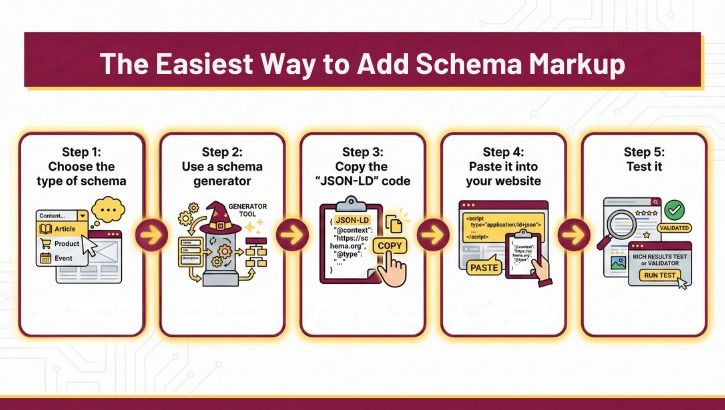
Here’s a very simple workflow students can follow:
Step 1: Choose the type of schema
(article, FAQ, local business, course, etc.)
Step 2: Use a schema generator
You fill in a form, and the tool creates the schema code for you.
Examples:
Step 3: Copy the “JSON-LD” code
This code looks like a block of text (not scary).
Step 4: Paste it into your website
Usually in the <head> section or via a plugin.
Step 5: Test it
Use Google’s Rich Results Test or Schema Markup Validator.
No advanced coding needed.
No special software needed.
Just simple, logical steps.
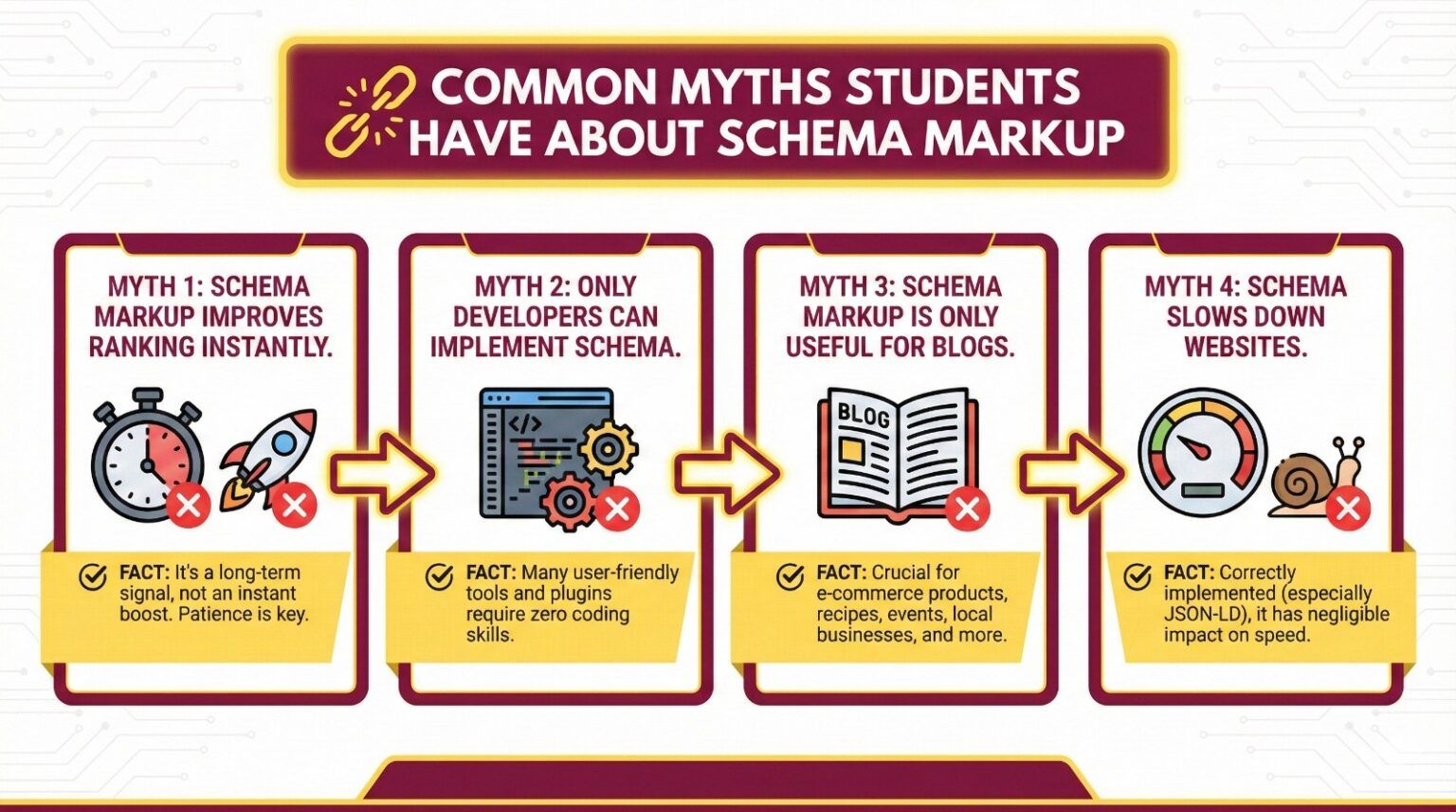
Myth 1: Schema markup improves ranking instantly.
Truth: It improves visibility, not ranking directly. But better visibility leads to better performance overall.
Myth 2: Only developers can implement schema.
Truth: Anyone can be an absolute beginner.
Myth 3: Schema markup is only useful for blogs.
Truth: It works for businesses, events, courses, portfolios, and more.
Myth 4: Schema slows down websites.
Truth: Schema is lightweight and improves search performance.
Companies today prefer candidates who understand both content and structure.
Whether you’re into marketing, tech, or analytics, schema markup shows employers that you:
In training environments like WHY TAP which emphasise hands-on learning, real-time projects, AI-powered tools, and portfolio building schema markup is one of the practical skills that elevate students from beginners to job-ready professionals.
Schema markup may sound technical at first, but it’s actually one of the easiest ways to enhance your website and improve search visibility even if you’re not from a coding background.
Here’s what you should remember:
If you’re a non-technical student, start with just one schema type like FAQ or Article schema and gradually learn more. The more you explore, the more confident you’ll become.
And if you’re learning at a place like WHY TAP, schema markup is one of the many practical, industry-grade skills you’ll be exposed to helping you build a strong foundation for your IT career.