




Table of Contents
- 1.
- 2.
- 2.1
- 2.2
- 2.3
- 2.4
- 2.5
- 3.
- 3.1
- 3.2
- 4.
- 4.1
- 4.2
- 4.3
- 5.
- 5.1
- 5.2
- 5.3
- 6.
- 6.1
- 6.2
- 6.3
- 6.4
- 6.5
- 7.
- 7.1
- 8.
- 8.1
- 8.2
- 8.3
- 8.4
- 8.5
- 9.
Introduction
Choosing between Python vs SQL vs Power BI confuses almost everyone entering the data field in 2026. You want a data career, but you don’t know what to learn first. Some say Python opens all doors. Others insist SQL is non-negotiable. Many recruiters ask for Power BI skills even for entry-level roles. This confusion delays careers more than lack of talent.
The data job market itself explains this dilemma. According to industry hiring reports, over 80% of data roles require SQL, while Python appears in a majority of advanced analytics and data science jobs (365datascience). At the same time, business intelligence tools like Power BI continue to grow as companies push for faster, visual decision-making across teams. Employers don’t hire tools in isolation. They hire people who solve problems using the right tool.
This blog breaks down Python vs SQL vs Power BI from a career-first perspective. You’ll learn what each tool actually does, where it fits in real jobs, and what you should learn first in 2026 based on your career goals in data.
Understanding the Modern Data Career Landscape (2026 Outlook)
If you’re planning a data career in 2026, here’s the truth: data jobs aren’t disappearing they’re evolving fast. Companies no longer want people who only “pull reports.” They want professionals who can query data, analyze patterns, and explain insights clearly to business teams.
According to global workforce reports, data-related roles are expected to grow over 20% this decade, much faster than average jobs. Every industry finance, healthcare, e-commerce, marketing, manufacturing now runs on data. That’s why tools like SQL, Python, and Power BI are no longer optional skills.[WORLD ECONOMIC FORUM]
How Data Roles Have Changed
Earlier, a data analyst’s job ended with Excel reports. In 2026:
- Analysts pull data directly from databases (SQL)
- Automate cleaning and analysis using Python
- Present insights through interactive dashboards (Power BI)
- Work closely with business, product, and leadership teams
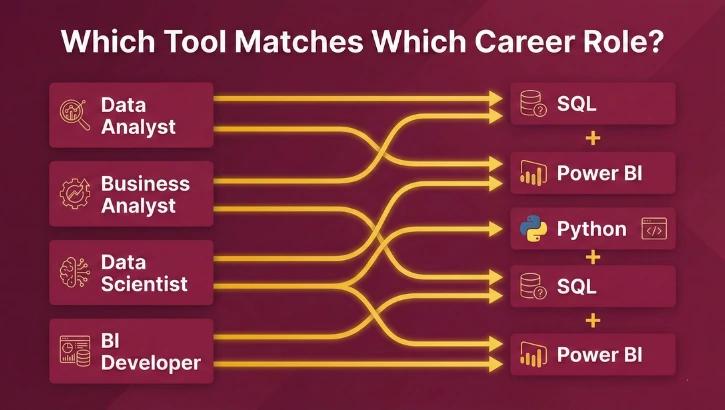
Common Data Roles & Tool Usage (2026)
| Role | Primary Tools Used | What They Actually Do | ||
|---|---|---|---|---|
| Data Analyst | Business Analyst | Data Scientist | BI Developer | Analytics Engineer |
| SQL, Power BI, Excel | Power BI, SQL | Python, SQL | Power BI, SQL | SQL, Python |
| Analyze data, create dashboards, answer business questions | Translate data insights into business decisions | Build predictive models, advanced analytics | Design enterprise dashboards and reports | Prepare clean, analytics-ready data |
What This Means for Learners
Companies now hire based on skill combinations, not single tools. Someone who knows only Python but no SQL, or only Power BI without data understanding, often struggles.That’s why choosing what to learn first matters. In the next sections, we’ll break down Python vs SQL vs Power BI so you can build a data career that’s practical, hireable, and future-ready.
What Power BI Is Used for in Data Careers
Power BI plays a critical role in modern data careers because businesses don’t just want analysis. They want clear, visual answers they can act on quickly. In 2026, most organizations already collect data. Their biggest challenge is turning that data into decisions people actually understand.
Power BI solves this gap
Instead of writing complex code, professionals use Power BI to transform raw data into dashboards, reports, and stories that leadership teams rely on daily. According to industry usage data, business intelligence and data visualization skills appear in a majority of data analyst job descriptions, especially for entry and mid-level roles.
Power BI is commonly used for:
- Dashboard creation
Professionals build interactive dashboards that track sales, revenue, performance, and KPIs in real time. - Business reporting
Teams replace manual Excel reports with automated, refreshable Power BI reports.
Example:
A sales manager doesn’t want SQL queries or Python scripts. They want to know which region underperformed this month and why. A Power BI dashboard answers that in seconds.
Power BI roles typically include:
- Data Analyst
- BI Analyst
- Reporting Analyst
- Business Analyst
In data careers, Power BI acts as the bridge between data and decision-makers. That is why many professionals start their data journey here before moving deeper into SQL or Python.
What Is Python and Why It Unlocks Advanced Data Careers
Python is more than just a programming language in the data world, it’s a power tool that takes you beyond basic reporting into advanced analytics and automation. While SQL helps you fetch data and Power BI helps you visualize it, Python helps you do everything in between and much more.
In real-world data jobs, Python is used to:
- Clean messy, unstructured data at scale
- Automate repetitive analysis tasks
- Perform statistical analysis and forecasting
- Build machine learning models
- Work with APIs, files, and real-time data
This is why Python dominates advanced roles. According to multiple hiring reports, over 65–70% of Data Scientist and Machine Learning job postings list Python as a core requirement, making it one of the most in-demand skills in data careers heading into 2026.[deeplearning]
Why Python Unlocks Career Growth
Python is often the career multiplier:
- It allows you to move from Data Analyst → Senior Analyst → Data Scientist
- It integrates easily with SQL databases and BI tools
- It’s AI-friendly, future-proof, and widely supported
Limitations to Know
Python isn’t always beginner-friendly:
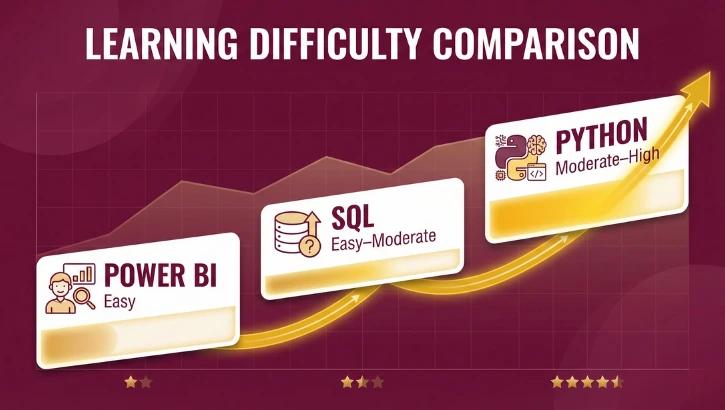
- Steeper learning curve than SQL or Power BI
- Overkill for simple dashboards
- Requires logical thinking and practice
If your goal is long-term growth, higher salary potential, and advanced roles, Python is the tool that unlocks those doors. But it works best when paired with strong SQL fundamentalsand business context, not learned in isolation [w3school]
Next, we’ll see how Python compares directly with SQL and Power BI and where each one fits best.
Python vs SQL vs Power BI Side-by-Side Comparison
If you’re stuck choosing between Python vs SQL vs Power BI, you’re not alone. Each tool plays a different role in the data workflow, and confusion usually happens when beginners try to compare them as equals. They’re not competitors they’re complements.
Think of it like this:
- SQL gets the data
- Python processes and analyzes the data
- Power BI explains the data to humans
Core Differences at a GlanceReal-World Example
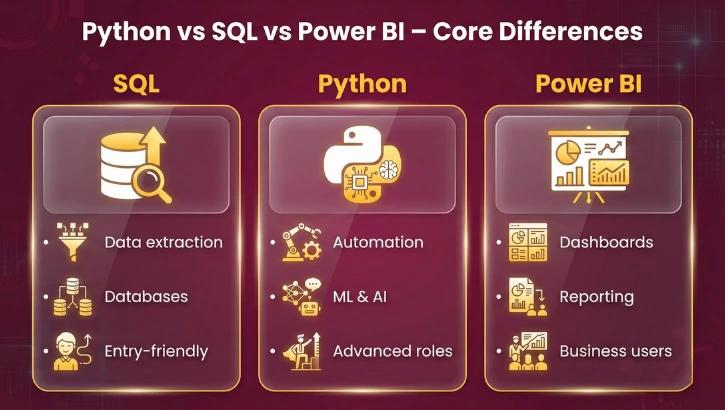
| Factor | SQL | Python | Power BI | |||
|---|---|---|---|---|---|---|
| Primary Purpose | Learning Difficulty | Used By | Automation Capability | Visualization | AI / ML Ready | Job Requirement Frequency |
| Query & extract data | Easy–Moderate | Data Analysts, Engineers | Limited | Very Basic | No | ~70–80% of data roles |
| Analysis, automation, ML | Moderate–High | Analysts, Scientists | Very High | Moderate | Yes | ~60–70% (advanced roles) |
| Visualization & reporting | Easy | Analysts, Business Users | Low | Advanced | No | ~40–50% (BI roles) |
Real-World Example
Imagine an e-commerce company:
- SQL pulls last year’s sales from the database
- Python cleans the data, detects trends, predicts future demand
- Power BI turns results into dashboards for managers
Which Tool Wins?
There’s no single “best” tool it depends on your goal:
- Want a job quickly? → Start with SQL
- Want to impress business teams? → Add Power BI
What Should You Learn First? (Clear Decision Framework)
Choosing between Python, SQL, and Power BI becomes easy once you stop asking “Which tool is best?” and start asking “What do I want my first data job to be?” In 2026, hiring managers don’t expect beginners to know everything
they expect the right starting skill.
If You Are a Complete Beginner (No Tech Background)
Start with SQL.
- SQL appears in 70–80% of entry-level data job descriptions
- It teaches how data is structured and queried
- You’ll become job-ready faster than with Python
Example: A fresher who learns SQL can start answering real business questions within weeks.
If Your Goal Is a Job in 3–6 Months
Go with SQL + Power BI.
- SQL gets the data
- Power BI shows insights clearly
- This combo matches most Data Analyst and Business Analyst roles
Many companies hire analysts who mainly query data and build dashboards, not complex models.
If You Want Long-Term Growth & Higher Salaries
Choose Python but after SQL basics.
- Python dominates Data Scientist and advanced analytics roles
- Over 65% of high-paying data roles require Python
- Enables automation, AI, and predictive analytics
Example: Analysts who add Python often move into senior or specialist roles
Recommended Learning Path for Data Careers (2026 Roadmap)
If you want to build a practical, hireable data career in 2026, the smartest move is to follow a step-by-step learning path, not random courses. Employers don’t hire tool collectors,they hire people who can solve data problems end to end.
Here’s a proven roadmap that aligns with how data teams actually work today.
Step 1: Start with SQL (Foundation Stage)
SQL should be your first stop.
- Used in 70–80% of data job roles
- Teaches how real company data is stored and queried
- Fastest way to become job-ready
Focus on:
SELECT, WHERE, JOINs, GROUP BY, subqueries, basic window functions
Outcome: You can answer real business questions using data.
Step 2: Add Power BI (Business Impact Stage)
Once you can fetch data, learn how to communicate insights.
- Businesses value dashboards more than raw analysis
- Power BI is widely used in corporate reporting teams
Focus on:
Data modeling, DAX basics, interactive dashboards, storytelling
Outcome: You can present insights to managers and stakeholders.
Step 3: Learn Python (Career Acceleration Stage)
Python comes next not first.
- Required in 65%+ of advanced analytics and data science roles
- Helps automate, analyze large datasets, and work with AI tools
Focus on:
Pandas, NumPy, visualization, basic statistics, automation
Outcome: You move from “report creator” to “problem solver”.
Optional Add-Ons (After Core Skills)
- Excel (advanced formulas)
- Cloud basics (BigQuery, Azure, AWS)
- AI-assisted analytics tools
Final Roadmap Snapshot
SQL → Power BI → Python
This sequence keeps you employable early, valuable mid-career, and future-proof long term. Learn smart, not rushed and your data career will scale with you.
Your data career doesn’t need random tools. It needs the right sequence.
Learn Python, SQL, and Power BI the job-ready way with WHY TAP’s PG Certification in AI-Powered Data Science.
How AI Is Changing the Way These Tools Are Used
AI is reshaping how Python, SQL, and Power BI get used in real data jobs. In 2026, professionals spend less time on manual execution and more time on judgment, interpretation, and action. AI handles the heavy lifting. Humans steer the outcome.
Here’s what has changed across tools:
- SQL becomes faster and more accessible
AI-assisted query builders help users write and optimize queries. Professionals focus on what to ask rather than how to write it. - Python shifts from syntax to experimentation
AutoML and AI libraries generate models quickly. Analysts spend more time validating results, testing scenarios, and explaining impact. - Power BI turns into an insight engine
AI visuals, natural-language Q&A, and automated summaries help teams spot trends without digging through charts.
AI also raises expectations
- Leaders expect clear recommendations, not raw outputs
- Teams expect confidence in insights, not just dashboards
- Businesses expect responsibility for decisions, not tool usage
Example:
According to global workforce reports, analytical thinking and problem-solving remain among the top skills employers value, even as automation grows. This explains why AI reduces coding effort but increases responsibility.
In practice, AI doesn’t replace Python, SQL, or Power BI. It changes how you use them. Tools execute faster. Professionals decide smarter.
Common Mistakes Beginners Make (And How to Avoid Them)
Most people don’t fail in data careers because they lack intelligence they fail because they learn in the wrong order or follow internet hype. If you avoid the mistakes below, you’ll save months (sometimes years) of effort.
Mistake 1: Trying to Learn Everything at Once
Many beginners start Python, SQL, Power BI, Excel, and AI tools together.
- Result: confusion, burnout, zero mastery
- Reality: Hiring managers prefer strong basics in 1–2 tools over shallow knowledge of five
Fix: Learn in layers — SQL → Power BI → Python.
Mistake 2: Skipping SQL and Jumping Straight to Python
Python looks exciting, but over 70% of data jobs still require SQL.
- Without SQL, you can’t access real company databases
- Many Python-only learners struggle in interviews
Fix: Learn SQL first. Even basic SQL gives you an edge.
Mistake 3: Treating Power BI as “Just a Tool”
Some learners focus only on visuals and ignore data logic.
- Dashboards without insights don’t impress employers
- Business teams care about why, not just charts
Fix: Always connect dashboards to real business questions.
Mistake 4: Watching Tutorials Without Practice
According to learning research, passive learning reduces retention by over 50%.
- Watching ≠ learning
- Interviews test problem-solving, not video memory
Fix: Build mini-projects after every topic.
Mistake 5: Chasing Certificates Instead of Skills
Certificates don’t guarantee jobs.
- Recruiters prioritize projects and practical exposure
Fix: Create a portfolio with SQL queries, Power BI dashboards, and Python notebooks.
Data tools matter. Decision-making matters more.
WHY TAP’s PG Certification in AI-Powered Data Science teaches you how to use Python, SQL, and Power BI with AI for real business impact.
Conclusion
Choosing between Python, SQL, and Power BI doesn’t have to feel overwhelming. As you’ve seen, these tools aren’t rivals, they're pieces of the same data puzzle. SQL gives you access to real-world data, Power BI helps you turn insights into clear business stories, and Python unlocks advanced analysis, automation, and long-term growth. The mistake most beginners make is chasing trends instead of following a clear, role-driven learning path.
The smartest approach in 2026 is simple and proven: build foundations first, then scale your skills. When you learn tools in the right order, you reduce confusion, speed up employability, and create room for career growth.